
INTRODUCING THE CONTROLLER MODULE
Controller module allows you to design a custom “front panel” UI for a patch. When a patch containing Controller module is loaded in miRack AUv3 plugin, the designed panel will be shown, hiding the rest of the patch. Now you can create effect or instrument patches having all the power of miRack modules under the hood but hiding their complexity behind a custom UI. Below is an example of what it may look like when a patch with Controller module is loaded inside an AUv3 host app (Kymatica AUM in this case):
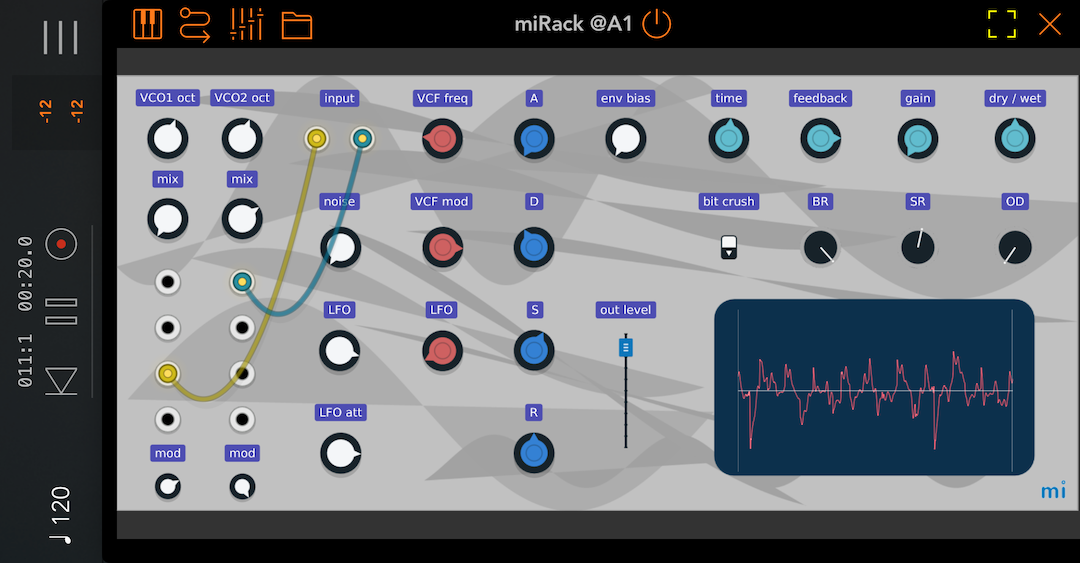
Controller module is available for purchase in the module browser. See its in-app manual for more details about the module functionality or try the included Controller Demo patch.
ALSO IN THIS UPDATE
- Improved support for the latest iOS, iPadOS and macOS versions and major DAWs.
- Improved support for mouse within miRack, both on iPadOS and on macOS.
- Improved support for Apple Pencil. Double tap and squeeze actions can be configured in application settings.
- Custom names can now be assigned to AUv3 parameters mapped to module controls. These names will be visible in DAWs instead of the default ‘Parameter NN’ names. Note that not all DAWs and AUv3 hosts support dynamically changing parameter names, some may even not work correctly with them, therefore this feature needs to be enabled in miRack settings first.
miRack Legacy AU and VST plugins have also been updated to support this feature, so make sure to download the latest versions. - AUv3 hosting modules now support built-in Apple effect audio units. They are hidden by default and can be enabled in the module menu.

(macOS version will be available shortly)